We wrote to a Control4 remote's screen, with no Control4 processor
We put a game on the LCD of an SR-260, driven by the remote's own keys, with zero Control4 equipment on the network. The game is the excuse: what it proves is that the screen is a legitimate write target from Home Assistant. And the test produced something that existed nowhere else — the datasheet for that display.
The equipment left without a brain
A Control4 installation with no controller — because it burned out, because the licence was never renewed, or because the integrator who installed it is long gone — leaves the owner with expensive hardware that stopped responding. The keypads, dimmers and remotes are still there, still working over radio, and nothing is talking to them.
The question that opened this line of research is a blunt one: can that hardware be rescued? Not by emulating a controller, but by speaking its own protocol from an open system.
What has to be proven for the answer to be yes
That the loop closes in both directions: that the Control4 device talks to us, and that we can talk back to it.
The missing half
The previous investigation had already closed the input direction: the red button on an SR-260 switches a SONOFF device — a different brand — with no Control4 processor anywhere in the installation. The remote talks; we listen.
What was missing was output, the harder half: us writing to proprietary equipment. And the best possible target is the remote's screen, because the result is visible — you don't have to take a log file's word for it.
The descriptor lies: the remote sleeps
Every Zigbee device publishes a descriptor stating what it can do. The SR-260's declares
mac_capability_flags = 140, and bit 3 of that value means receiver always on:
a device you can write to at any moment.
It does not honour that. A burst of 30 writes with the remote idle failed entirely, at nearly 15 seconds per attempt. The same writes land without trouble while the user is holding a key down.
- idle
- 0 of 30 writes delivered · ~14.7 s per attempt
- key held
- 100% delivery
- held-key tick
- 487 ms ±15 — the documented protocol said 100 ms
- real ceiling
- 2.05 frames per second, set by the remote, not by the network
The real model
The remote can only be drawn to while it is transmitting. Holding a key wakes it every 487 ms, and that is the entire window.
That measurement is not a curiosity of the game. It is what you need to know before attempting any integration with these remotes: a label pushed "when something happens" never arrives, and the system looks broken without being broken.
The display, measured
Neither Control4's documentation nor the community has this written down. It came out of probing the screen character by character, code by code.
The character ROM stops at 0x7E. No blocks, no arrows, no silhouettes: any drawing has to be made out of ASCII.
- width
- There is no width in characters. The font is proportional and the cut-off is in pixels: 30 dots fit, or 17 capitals
- multiline
- The direct message collapses the line break into a space
- clearing
- A write does not erase the previous one: if the new text is shorter, the tail of the old one stays on screen
- forbidden
"\]— the command's delimiter and escape; they are swallowed by the frame- icons
- The icon byte draws nothing. 84 codes tested, including the one a real Control4 processor uses
Every one of those lines cost a test, and several contradict the documentation we started from. When the hardware and the paper disagree, the hardware wins.
The finding that came from watching the device, not the manual
With a single line of text and no graphical glyphs, the result was going to be poor. The protocol documentation also carried a warning: do not use the list menu, because it suppresses button events.
The warning was overstated, and it nearly killed the best design. It suppresses two keys, not all of them. What prompted a second look was a common-sense observation: with a real Control4 processor, the remote's Watch key shows a list of sources across several rows. If the device can already do that, it can be used.
- rows
- Three: a free-text title plus two lines
- keys
- Still emit events with the list on screen, with no losses
- speed
- 489 and 493 ms between repaints — identical to the direct message
- bonus
- The selected row is drawn in inverse video: a solid bar, for free
Why this matters more than the game
Three rows of free text plus a highlight bar, repaintable twice a second, is a complete user interface on a device that was assumed to be read-only.
The result, on the remote's screen
The white bar is the ground: it is the menu's selected row, drawn in inverse video by the remote itself. The dino jumps by changing rows, and the cactus passes underneath.
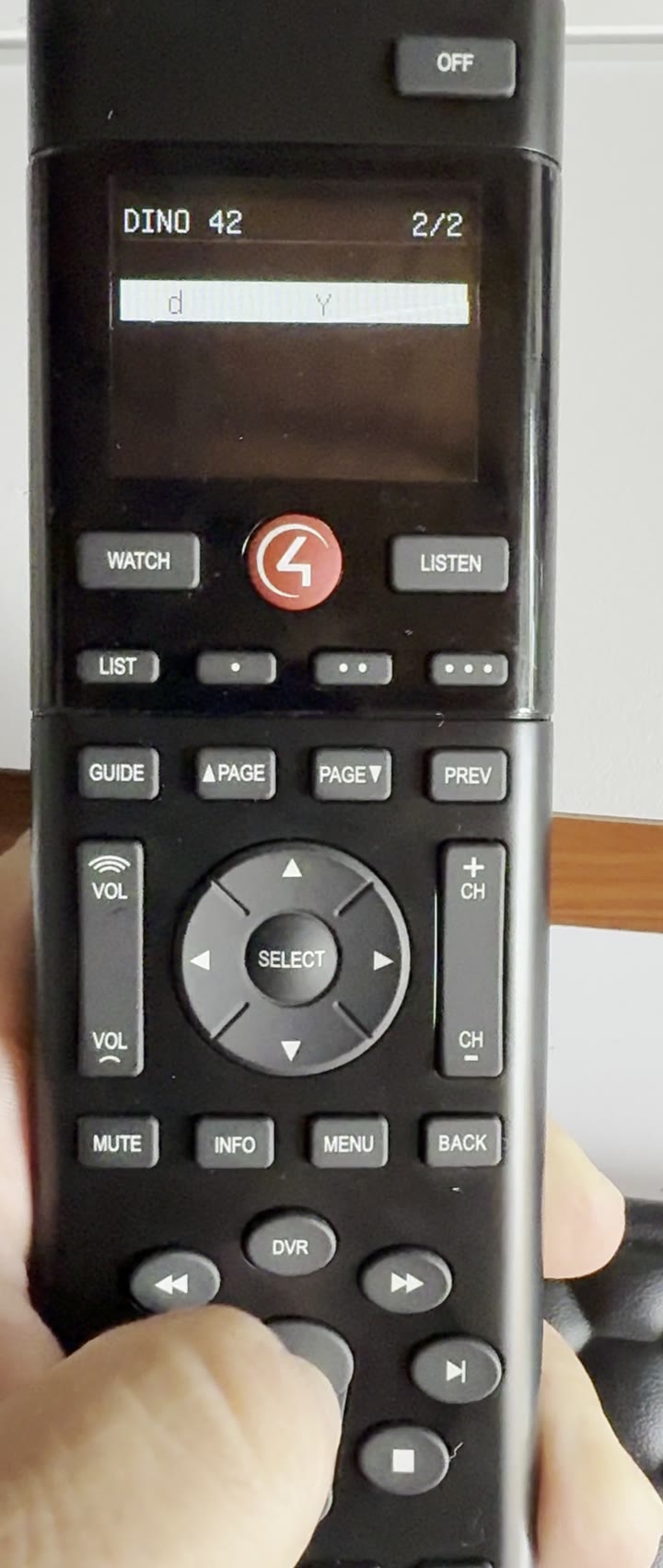
How it is played
- hold Play
- Run — every wake-up of the remote advances the world one step
- release Play
- Jump, and the world advances too
- OFF
- Stop the game and clear the screen
It is not played with the red button: that is one of the keys that dismiss any list on screen. We found out by running into it.
Our own bench: one SR-260, a generic Zigbee coordinator and Home Assistant. No other Control4 equipment.
What an integrator takes away from this
The game is useless in production. What is useful is what it took to build it:
- rescue
- A site with an orphaned Control4 system can keep running from an open platform, with its keypads and remotes alive and their screens usable
- diagnosis
- Knowing the remote sleeps and only receives while transmitting explains failures that otherwise look like "the device is broken"
- interface
- Three writable rows turn the remote into a status display for any system, not just Control4
- method
- Everything was measured on our own hardware, with the numbers and conditions recorded. It can be repeated
The code is open and published, with the game logic separated from the networking: 26 automated tests run with no radio, no Home Assistant and no remote. Three of those tests exist because of bugs found on real hardware, and they are there so those bugs do not come back.
What we are not claiming
Research that overstates its reach produces confident, wrong decisions. The limits, written in the same type as the results:
- one model
- Verified on an SR-260. Other Control4 remotes are untested
- one version
- We claim no compatibility with any remote firmware or any Zigbee coordinator
- not a product
- This is a research prototype on hardware we own. It is not a driver, an installer, or a supported integration
- third-party dependency
- The quirks that translate the protocol are an external project with its own licence; they are not redistributed here
The lab's rule
If the document and the hardware disagree, the hardware wins: note it and fix the document. In this investigation that happened twice, and both times the document was wrong.